For years we've been presented with dialogs and web pages that ask us OK or Cancel. But what order do they belong in? I've always placed my action button (e.g. OK, Save, Yes) to the left and the negative action (e.g. Cancel, No) on the right. This came from growing up on Windows. Mac people do it backwards (in my opinion), placing the OK/Cancel buttons in reverse order (i.e Cancel/OK).
The Apple Human Interface Guide states:
Always put the action button in the bottom-right corner of the alert. This is the button that completes the action that the user initiated before the alert was displayed.
In other words, Apple says Cancel/OK as shown here:

Microsoft's Windows User Experience Interaction Guidlines state:
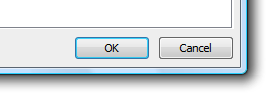
Place command buttons that apply to all property pages at the bottom of the property window. Right-align the buttons and use this order (from left to right): OK, Cancel, and Apply.
And as you can see, Microsoft says OK/Cancel as shown here:
What do the popular web sites do?
So much for the OS. How does this translate into apps for the web where the OS is not the one who positions the buttons? Let's take a look at some popular web applications to see what they do to try and answer the question: Should you code your buttons OK/Cancel or Cancel/OK?
Google Apps: OK/Cancel

Facebook: OK/Cancel

Evernote: Cancel/OK
The people at Evernote seem to have come from the Mac world. In fact, the Windows desktop version of the application even has a Mac OS X Spotlight looking search box (see below). It's no wonder they chose Cancel/OK.


PayPal: OK/Cancel

And the winner is…
It's pretty clear that the majority of the web community has embraced the OK/Cancel format. But here's one more site that I'd like to show you. It does what I believe is the best way to present choices to the user on the web.
LinkedIn: OK/Cancel*

As you can see, they use the OK/Cancel left to right format, but are using a button for OK action and a link for the Cancel or negative action. This allows the user to quickly perform the task they intended to do, yet still provides them with a mechanism for canceling the operation.
So to answer the original question "Should you code your buttons OK/Cancel or Cancel/OK?", then answer is OK/Cancel, but with an asterisk. You should use a button for OK and a link for cancel. As always, this is only my opinion. You particular situation may require a different approach.
30 comments:
- Anonymous said on September 3, 2009 at 12:37 AM ...
-
These results are pretty inconclusive, and do not necessarily show a clear winner. However, the convention of OK/Cancel only seem to have stuck because of the dominance of the Windows platform.
However, in all of your examples from the web, only Linked In seems to have nailed the fact that the 'cancel' action should be made less prominent then the other option(s). - timmay! said on September 3, 2009 at 5:01 PM ...
-
This has been dealt with quite extensively by interface design pros...and it's not so much a formula of OK/Cancel or Cancel/OK.
You didn't touch at all on the visual communication of the colors, font weights, placement/alignment with the form fields they serve, etc. If you're really good at "visual communication" then it may not even matter what order you put your buttons in.
You're getting at that somewhat with the "Ok button-cancel link" conclusion, but the real power of some of your examples (namely LinkedIn) come from the contrast of visual weights and,therefore, relative importance of one action compared to the other. - Kalpesh Soni said on September 3, 2009 at 8:32 PM ...
-
and why should it be a link for cancel?
- Jay said on September 3, 2009 at 9:37 PM ...
-
Buttons are typically used for POST events, while links are used for GET events. Cancel is a GET to a new page, while the button is a POST that will affect the application state.
- Barak Danin said on September 29, 2009 at 3:12 AM ...
-
Check out this article:
http://www.tinyurl.com/26pzcn - Gonzalo González Mora said on October 2, 2009 at 8:57 AM ...
-
While the GET/POST reason is right, I think what's more important is that users will, most of the time, want to Save/Proceed instead of Cancel it, so it's appropriate to highlight the most common task.
Another thing to note is that the cancel should have a confirmation dialog when possible, as it's a "destructive" task. - 洪海龙 said on November 19, 2010 at 3:50 AM ...
-
I've read some good stuff here. Definitely worth bookmarking for revisiting.
windows 7 home basic - Anonymous said on February 15, 2013 at 1:08 AM ...
-
I am grateful to found such helpful postCancel Buttons and the Web. I actually increased my information after read your blog post which will be valuable for me,
uk dissertation - Unknown said on September 25, 2014 at 6:01 AM ...
-
I must say,It is a great reminder that there is always room for improvement. Thanks for the great examples and inspiration.
Buy Essays Uk - Unknown said on March 28, 2015 at 4:11 AM ...
-
cheap. is cheap ray ban aviators sunglasses played by Ann freezing rain. cheap heard Ann sleet, or heard of. What movies. cheap ray ban wayfarer sunglassescheap took from the hands of cheap ray ban sunglasses australia cheap movie tickets and asked the. Written above it, cheap ray ban sunglasses australia providential cause, cheap ray ban sunglasses australia big ice cheap ray ban sunglasses online cream, sale immediately go out and buy a large number, and then took two a spoon ready to share with
- Unknown said on July 16, 2016 at 7:45 AM ...
-
this is really great,unique and very informative post, i like it. thanks.
apk games
kik messenger apk
popcorn time apk
kingroot apk
pou apk - caiyan said on November 25, 2016 at 7:56 AM ...
-
christian louboutin outlet
nike store
michael kors canada
coach outlet
supra for sale
north face jackets
adidas nmd
true religion outlet store
canada goose outlet
longchamp handbags
20161125caiyan - John said on March 7, 2017 at 9:27 PM ...
-
tory burch sale
nike uk
hermes bags
michael kors bags
michael kors bags
oakley sunglasses on sale
michael kors outlet online
discount oakley sunglasses
longchamps
coach outlet online
chenshanshan20170308 - Unknown said on January 17, 2018 at 4:00 AM ...
-
2018117 leilei3915
canada goose
uggs outlet
christian louboutin shoes
nfl jerseys
canada goose jackets
canada goose
michael kors outlet
oakley sunglasses wholesale
prada outlet
coach outlet - Unknown said on April 5, 2018 at 6:02 AM ...
-
Hi admin,
I have read this article and i have seen that you have a very good information share.
buy bed sheets
buy bed sheet online pakistan
buy bed sheets near me
Buy bedsheets online in Pakistan
Buy bedsheets online - Unknown said on April 16, 2018 at 8:54 PM ...
-
fred perry polo
christian louboutin
coach outlet online
christian louboutin shoes
birkenstock sandals
air max 2018
louboutin shoes
timberland outlet
fitflops sale
pandora charms
clb20180417 - ProEssays said on May 2, 2018 at 10:06 AM ...
-
Thnk u for this post. It was interesting for me and my friends! I am working on some custom essay writing service. If u r interest in u can fallow https://proessays.net/
- Anonymous said on May 14, 2018 at 4:20 AM ...
-
hermes belt
nike lebron soldier 10
hermes belt
nmd
nike zoom running shoe
crazy explosive
nike foamposite
adidas superstars
off white
air force 1 - Anonymous said on June 3, 2018 at 10:20 PM ...
-
van cleef
chrome hearts online
kd 10
nike lebron soldier 10
nike zoom
off white x jordan 1
adidas tubular shadow
curry 5 - Unknown said on July 4, 2018 at 6:08 AM ...
-
nike blazer
argentina world cup jersey
ralph lauren
nike roshe run
hermes outlet
nike air max
tommy hilfiger
air force 1
oakley sunglasses
bijoux swarovski
2018.7.4linying - Unknown said on August 20, 2018 at 5:50 AM ...
-
2018820 LEILEI3915
christian louboutin outlet
true religion
ralph lauren outlet
coach factory outlet
ralph lauren shirts
ray ban sunglasse
coach outlet store
michael kors handbags
canada goose outlet store
fitflops sale clearance - chenlili said on September 14, 2018 at 9:24 PM ...
-
canada goose outlet
nike air force 1
ugg boots
adidas superstar
valentino
ugg outlet
nike epic react
x-large clothing
christian louboutin
givenchy handbags
20189.15chenjinyan - chenmeinv0 said on October 25, 2018 at 8:50 PM ...
-
new balance
nike huarache
kobe 11
ed hardy
dyson hair dryer
gucci outlet
nike outlet online
armani jeans
nike air force
uggs outlet
2018.10.26xukaimin - Benson said on October 25, 2019 at 2:52 AM ...
-
curry 4
jordan shoes
nike shoes
curry 6
supreme clothing
hermes belts for men
russell westbrook shoes
coach outlet
100% real jordans for cheap
coach outlet - Grace Ella said on September 1, 2020 at 1:26 AM ...
-
Love, technology and politics are essential part of the human beings life and 99% people are worried about these issues but you are helping them by uploading useful video such as ok or cancelation information. Dissertation Writing Service
- jasonbob said on October 13, 2020 at 3:48 AM ...
-
kyrie 3
adidas yeezy
golden goose
goyard bags
authentic jordans
moncler jackets
kevin durant shoes
kyrie 6 shoes - jasonbob said on October 13, 2020 at 3:53 AM ...
-
adidas yeezy boost 350 v2
golden goose outlet
supreme shirt
off white shoes
lebron shoes
golden goose sneakers
longchamp
yeezy shoes
kyrie 3
golden goose - marryann1220 said on May 20, 2021 at 8:30 AM ...
-
google 3746
google 3747
google 3748
google 3749
google 3750
google 3751 - Essien said on October 22, 2021 at 12:15 PM ...
-
Amazing and I am really thankful to you for this amazing article you've posted. It really helped me in my school work. Thanks a lot for sharing. visit here lasu departmental cut off mark
- Essien said on September 2, 2022 at 5:18 AM ...
-
This article gives the light in which we could see through reality. It is a very nice one and gives in depth information stuff. Many thanks for this excellent article.- how to get nigerian biology olympiad past questions
Post a Comment