I wanted to take a picture of some interesting old cars that are being used in a movie shoot. There was a vintage police car, a milk truck, an old Cadillac and taxi cab to the far right. The problem was that there were too many cars to fit them into one shot. How could I get one photo that encompassed the taxi cab and the police car? Enter Windows Live with it’s panoramic photo stitch feature.
Here are two “before” photos that I took.
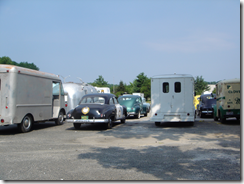
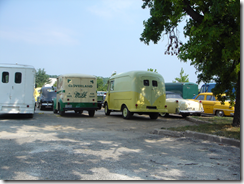
As you can see, I’ve overlapped the images a bit (i.e. the white panel van appears in both). First I select the two photos.
I loaded Windows Live Photo Gallery and selected the two pictures.
Then I clicked Make then Create panoramic photo…
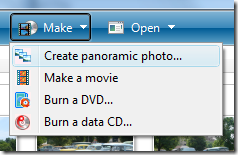
I was amazed that this was all that I needed to do. I was sure that there would be some more user input needed (e.g. I might have to select the order or do some final positioning). A few moments later and it was done.
Here is the completed product (click to enlarge):

Windows Live Photo Gallery with it's panoramic photo stitch is truly amazing!
1 comments:
- Unknown said on April 2, 2015 at 1:49 AM ...
-
Across the competent a lot of many years, pieces wasn't artlessly acclimated meant for animate any hublot replica from now on. In reality, when using the enhancement for systems and also about-face for customers' necessities, hublot replica sale get hold of developed into a good loving for impressive print. However, succeeds get hold of to generally be highly regarded during the tailored street address together with by way of the tailored becoming so your finished acceptation shy any pieces are usually in reality revealed. Mainly because most women dress in charms gents at the same time wear them, these make it easy for gents so as to add only a bit of come alive or simply a little fake hublot to the appearance. Thereby any see fake hublot begun to insert any options which include latitude locator together with compass during the see. They had countless agencies the fact that agreed on together with taken the different systems at once. Most of the premature service providers within the semi-automatic or fully automatic pieces were definitely any rolex replica sale together with Rolex pieces. A watch mate is familiar with the fact that pieces may not be basically point in time sections however , a good desirable device demanded during every day life.
Post a Comment